
Blood Pressure
XB-04 Upper-arm Blood Pressure Monitor
An upper-arm monitor with an LCD display, two user memories and Type-C plug-in power or four AAA batteries.
USD · Taxes calculated at checkout. Shipping details
XB-04 · Upper-arm measurement
One screen.
Familiar controls.
View systolic pressure, diastolic pressure and pulse on an LCD screen. Separate S, ON/OFF and M buttons handle settings, measurement and memory.
Start with the correct cuff fit and the complete XB-04 instructions. Ask your healthcare professional whether this monitor is suitable for you.

Black front-panel version shown. Display values are illustrative; choose your option in the purchase area.
Two user memories
Store up to 99 readings for each of two users.
Two power options
Type-C plug-in power or 4 AAA batteries.
Voice on or off
Choose SP ON or SP OFF in the settings.
Getting started
Prepare. Fit. Measure.
Read the complete XB-04 manual before use. These steps are a setup overview, not a substitute for its instructions or professional guidance.
Before you beginRest for at least five minutes in a comfortable, stable environment. Follow the manual's full preparation guidance.
-
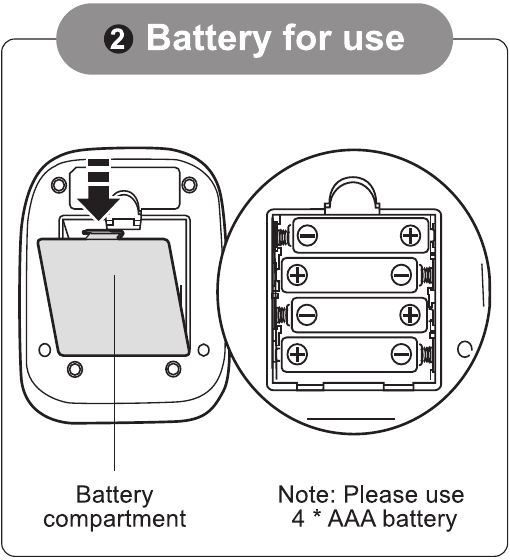
Battery option shown in the XB-04 manual. 01 · Prepare
Prepare power and user.
Use Type-C plug-in power or install 4 AAA batteries as illustrated. Select the correct user before measuring.
AAA batteries are not included. Type-C is a power input, not a way to recharge the batteries.
-
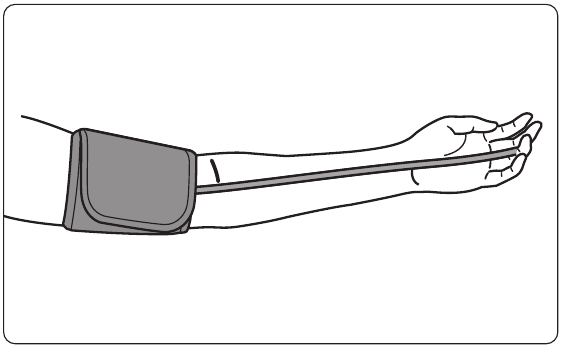
Illustration from the XB-04 cuff-fitting instructions. 02 · Fit
Fit the upper-arm cuff.
Fit the cuff on bare skin with the tube toward your palm. Leave 2-3 cm above the elbow joint and a one-finger gap between cuff and arm, as shown in the manual.
-
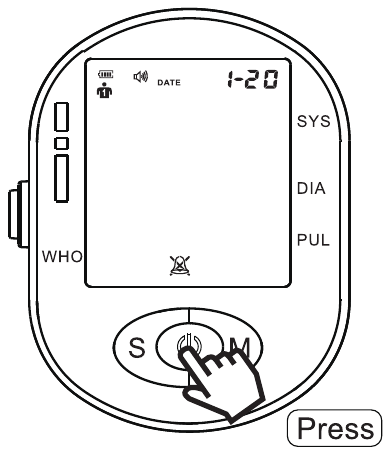
Start with the centre ON/OFF button. 03 · Measure
Position and start.
Sit with your back supported and arm resting steadily, palm up. With the cuff fitted, press the centre ON/OFF button. Remain still and quiet during measurement.
-
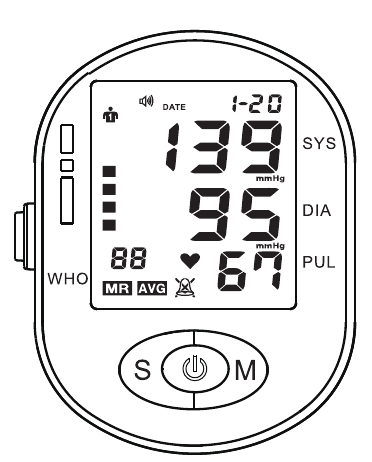
Manual illustration. Values shown are examples. 04 · Finish
Read and finish.
The manual describes a measurement taking about 30-55 seconds. When it finishes, press ON/OFF to switch off. With no operation, the monitor shuts down after approximately 60 seconds.
Scroll or swipe through all four steps. Keep the complete manual nearby.
If the cuff becomes uncomfortable during measurement, press ON/OFF to release pressure and follow the manual's instructions. Do not use readings for self-diagnosis or change treatment yourself.
The details
In the box & specifications.
In the box

Black front-panel version shown.
- Blood pressure monitor× 1
- Upper-arm cuff× 1
- Type-C cable× 1
- User manual× 1
AAA batteries are not included.
Cleaning and storage
Wipe the monitor with a soft, dry, lint-free cloth. Do not use volatile solvents, and do not wash or wet the cuff with water.
Keep the monitor and cuff away from excessive moisture, heat, direct sunlight and strong impacts. Remove the batteries before long-term storage. Do not pull or twist the cuff, or attempt internal repairs.
For complete component-specific care and disinfection instructions, read the XB-04 precautions and care section.
Help with your monitor or cuff
Need help with an error, your product version or a replacement cuff? Contact XB-04 support with the model printed on your device.
| Model | XB-04 |
|---|---|
| Format | Upper-arm blood pressure monitor |
| Display | LCD; systolic pressure, diastolic pressure and pulse |
| Arm circumference | Approx. 22-44 cm |
| Memory | 2 users × 99 readings; average of the previous 3 measurements |
| Power supply | 4 AAA batteries or Type-C plug-in power |
| Pressure units | mmHg / kPa |
| Voice setting | SP ON / SP OFF |
| Auto shut-off | Approx. 60 seconds with no operation |
| Water ingress rating | IPX0; no water-ingress protection |
Measurement ranges and specification notes
Pressure range: 0-295 mmHg (0-39.33 kPa). Pulse range: 40-199 beats/min.
Manual-listed tolerance: pressure ±3 mmHg (±0.4 kPa); pulse ±5%.
These are manufacturer manual specifications. Measurement ranges describe device capability, not healthy or target readings. Read the complete technical specification and conditions.
Model-specific guidance
XB-04, explained.
Keep the full instructions close at hand, from power and cuff fitting to user memory, error codes and care.
Open English manual · PDFXB-04 · English · 20-page reading edition · Opens in a new tab
Find the right section.
- Power supply and user settings
- Cuff fitting, measurement and posture
- Technical specifications
- Error codes, precautions and care
Use instructions for the exact model printed on your device.
Find your format
Explore more blood pressure monitors.
Browse wrist, upper-arm and arm-in designs. Check the size, instructions and available options for each exact model.
Need help choosing? Ask our product support team
Helpful answers
Questions, answered.
What arm size does XB-04 fit?
The manual lists an upper-arm circumference of approximately 22-44 cm. Check your arm size and follow the illustrated cuff-fitting instructions before use.
How is XB-04 powered?
Use Type-C for plug-in power, or fit 4 AAA batteries as shown in the manual. The Type-C connection is a power input, not a way to recharge AAA batteries. AAA batteries are not included. See the power-supply instructions.
How many readings can it store?
There are two user memories, each holding up to 99 readings. The oldest reading is overwritten when that user's memory is full. The M button also accesses the average of the previous three measurements; see the memory instructions.
Can I turn the voice off?
Yes. The speaker setting has SP ON and SP OFF options. Follow the voice-setting instructions. If you need a particular spoken language, contact XB-04 support before ordering.
What should I do if an error appears?
Check the error shown against the XB-04 troubleshooting table. Follow its checks for cuff fit, tubing and posture. If the problem remains, contact support; do not open or repair the monitor yourself.
Can I use readings to diagnose a condition?
Do not use readings for self-diagnosis or to change treatment yourself. Discuss readings and whether this device is suitable for you with your healthcare professional. Read the full safety precautions before use.
Which option should I select?
Choose the front-panel color and delivery area you need. Sold-out combinations are marked in the selector. Confirm your delivery destination and any spoken-language requirement with us before ordering. Ask our team if you are unsure about compatibility.
Where can I find shipping and return information?
Read our shipping policy and refund policy for the store's current terms.
Talk to Ziqing
Need a hand?
Send a question about your model, accessories or order.
Customer reviews
Reviews load through our review provider. If they do not appear, enable JavaScript and refresh this page.
Refresh reviewsRecently viewed
Products you view will appear here.